
Requirements #
Before installing Product Designer App (PDA), make sure your hosting environment and WordPress installation meet the recommended requirements below. Using the latest versions of WordPress, WooCommerce, PHP, and MySQL will provide the best performance, security, and compatibility.
Software Requirements #
| Component | Minimum | Recommended |
|---|---|---|
| WordPress | 6.0+ | Latest version |
| WooCommerce | 7.0+ | Latest version |
| PHP | 7.0+ | PHP 8.2 or newer |
| MySQL | 5.6+ | MySQL 8.0+ |
| MariaDB | 10.1+ | Latest stable version |
Note: Product Designer App is designed to work with actively supported versions of WordPress, WooCommerce, and PHP. Keeping your software up to date helps ensure compatibility and security.
PHP Extensions #
The following PHP extensions should be enabled on your server:
- OpenSSL
- GD
- ZIP
These extensions are commonly enabled on most modern hosting providers.
PHP Configuration #
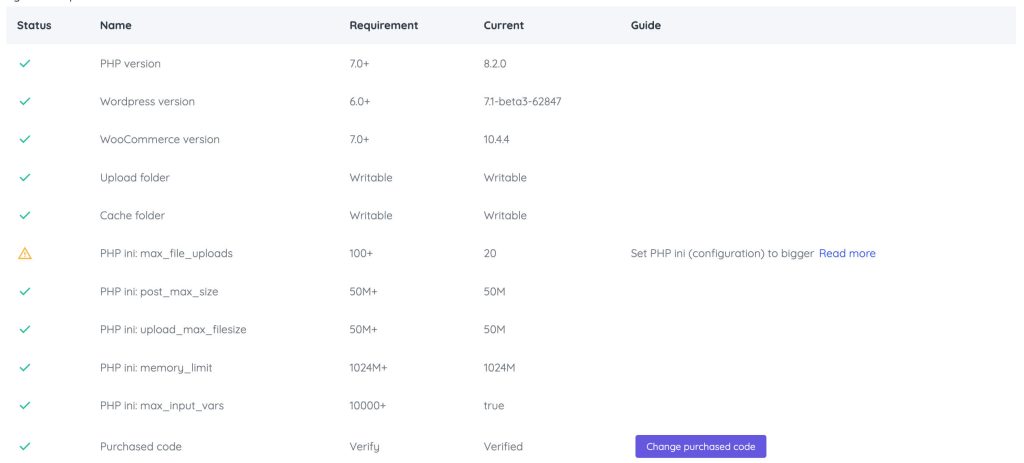
For optimal performance, we recommend the following PHP settings:
| Setting | Recommended |
|---|---|
| memory_limit | 1024M or higher |
| max_execution_time | 120 seconds |
| max_input_time | 120 seconds |
| upload_max_filesize | 50M or higher |
| post_max_size | 50M or higher |
| max_input_vars | 10000 or higher |
Larger values may be required if your store contains large product templates, high-resolution images, or extensive design assets.
Browser Support #
Product Designer App supports all modern desktop and mobile browsers.
Supported browsers include:
- Google Chrome
- Microsoft Edge
- Mozilla Firefox
- Safari
- Opera
For the best experience, always use the latest version of your browser.
Server Recommendations #
To ensure smooth operation, your hosting environment should provide:
- HTTPS (SSL certificate)
- Fast SSD or NVMe storage
- Sufficient CPU and RAM resources
- Stable internet connection
- Ability to increase PHP limits if needed
For stores with a large catalog or high traffic, a VPS or dedicated server is recommended over basic shared hosting.
WooCommerce Requirements #
Before using Product Designer App, ensure that:
- WooCommerce is installed and activated.
- Your WooCommerce store is fully configured.
- Products can be created and purchased successfully.
- The WordPress Media Library is functioning correctly.
- Permalinks are enabled.
If WooCommerce is not yet configured, complete the WooCommerce setup wizard before installing Product Designer App.
File Permissions #
WordPress must have permission to read and write files in the following directories:
wp-content/uploadswp-content/plugins- WordPress temporary upload directory
Improper file permissions may prevent image uploads, template imports, or export file generation.
Recommended Hosting Environment #
For production websites, we recommend:
- PHP 8.2+
- MySQL 8.0 or MariaDB 10.6+
- Nginx or Apache with the latest stable release
- HTTPS enabled
- HTTP/2 or HTTP/3 support
- Object caching (Redis or Memcached)
- OPcache enabled
- Regular automated backups
These configurations improve performance, scalability, and reliability, especially for stores with many products or frequent customer customizations.
Before You Install #
Before installing Product Designer App, verify the following:
- WordPress is installed and updated.
- WooCommerce is installed and activated.
- Your server meets the minimum PHP and database requirements.
- Required PHP extensions are enabled.
- PHP limits are sufficient for your workload.
- HTTPS is enabled.
- File permissions are correctly configured.
Learn More #
For advanced configuration and optimization, please refer to the Advanced Configuration document for detailed instructions.
Next Step #
Once your environment meets the requirements, continue to the Installation Guide to learn how to install, activate, and configure Product Designer App on your WooCommerce store.


